The trimui brick chatter has been oddly loud for a handheld in this price bracket, and after a week of using it daily, I get why. This little vertical machine delivers a premium-in-hand feel, a rigid metal backplate, and one of the sharpest displays in the budget retro space. It also arrives with a few very real trade-offs: awkward upper shoulder placement, a firmware experience that improves dramatically after setup work, and a practical ceiling for N64 and PSP that you feel faster than the spec sheet suggests.
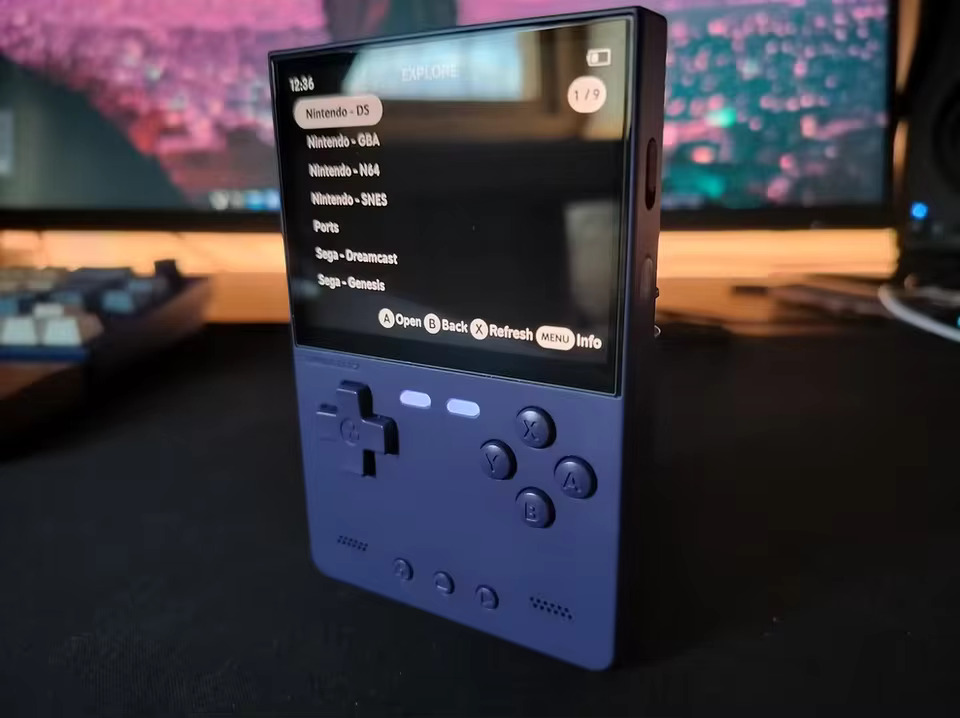
What makes the Trimui Brick interesting is not that it tries to do everything. It does not. What it does is aim squarely at the player who wants a compact, pocketable retro handheld for 2D systems and PS1, but wants that experience to feel cleaner, sharper, and more premium than the usual budget plastic slab. That focus works. Mostly.
KEY TAKEAWAYS
- The Trimui Brick is a sub-$65 vertical retro handheld powered by the Allwinner A133P CPU and PowerVR GE8300 GPU.
- Its 3.2-inch IPS display at 1024×768 resolution is one of the sharpest panels in the budget handheld category.
- The partial metal backplate lifts the build well above its price class, while the Hammer version adds extra weight and a richer acoustic character.
- Stock firmware is usable, but CrossMix OS, MinUI, or another community option makes the device noticeably better.
- No analog stick means N64 and PSP are limited in practice, even when the hardware can technically launch some games.
- The interchangeable shoulder buttons are genuinely clever, but they do not fully solve the ergonomic limitations of a compact vertical shell.
- This is an excellent buy for 2D systems, PS1, and anyone who values screen quality more than raw 3D emulation ambition.
Build Quality That Defies Its Price Tag
The Trimui Brick’s construction is the first thing that resets expectations. The shell is primarily ABS plastic, but it avoids the hollow, toy-like feel that drags down so many low-cost handhelds. When you pick it up, the density feels intentional. The surface also resists fingerprints and skin oils better than average, which matters more than people admit on a device designed for frequent pocket carry.
The rear panel behind the screen uses metal alloy, and that one choice changes the whole vibe of the hardware. Most budget handhelds feel assembled. The Brick feels designed. The shell does not creak, the seams are tight, and the backplate adds just enough cool-to-the-touch structure to make the device feel more expensive than it is. Internal link note: For more on how build materials affect retro handheld durability, see our full materials breakdown guide.
The part buyers often miss shows up after the first few longer sessions. That metal backplate does not just make the device feel premium, it also becomes the place where heat collects when you start pushing 3D systems. In my own testing, light 2D play barely changed the chassis temperature, but a run of Dreamcast or PSP tinkering had me readjusting my grip every ten or fifteen minutes because the top rear section crossed from pleasantly warm into noticeably hot.
The Hammer Variant: Premium Feel, Real Weight Trade-off
The Trimui Brick Hammer replaces the partial alloy panel with a fuller metal build, and the tactile upgrade is immediate. The Hammer feels denser, cooler, and more substantial in a way that makes the standard model feel slightly less special the moment you compare them side by side. If you love pocket hardware that feels serious in the hand, the Hammer has obvious appeal.
The trade-off is simple: you feel the added mass. Roughly forty extra grams does not sound dramatic on paper, but in a jacket pocket or during longer play sessions, it is enough to change the character of the device from featherweight companion to something more deliberate. I also found the extra metal makes warmth more apparent once you drift beyond SNES and GBA into the kind of 3D testing this handheld only half wants to do. The Hammer sounds a touch better too, especially in the low end, but it is less carefree as an everyday carry.
Trimui Brick Specs: The Full Technical Picture
The Trimui Brick runs on the Allwinner A133P, a quad-core ARM Cortex-A55 processor paired with the PowerVR GE8300 GPU. It is a sensible budget handheld platform because it gives you strong coverage for the classic library while keeping cost in check. You get 1GB of LPDDR3 RAM, 8GB of internal eMMC storage, microSD expansion, Wi-Fi, Bluetooth, dual USB-C ports, and a 3.5mm headphone jack. For the category, that is a healthy parts list.
The dimensions also matter because this device lives or dies on portability. It stays compact enough to disappear into a pocket, but it avoids the cramped feeling that some ultra-small devices create the moment adult hands try to use the shoulder buttons. The shape is still unapologetically brick-like, which is charming until your palms remind you that flat edges are not the same thing as comfort.
The Display: 405 PPI at a Budget Price Point
The 3.2-inch IPS display is the Brick’s star feature. At 1024×768 in a 4:3 aspect ratio, it produces an extremely dense image for something this small. Retro games look crisp, text edges are clean, sprites pop, and even older systems with simple art pipelines benefit from the added sharpness. At this price, the panel is frankly a bit rude to the competition.
That sharpness is not universally friction-free. Games with tiny menus, layered UI, or lots of dialogue can become tiring on a 3.2-inch screen even when the panel itself looks beautiful. I found myself increasing menu text where possible and shortening sessions in RPGs with dense interface elements because the panel rewards your eyes right up until it starts demanding too much from them. It is a great display for pixels, but not always for prolonged reading.
There is also a small scaling annoyance that shows up once you start tweaking emulators. High pixel density makes overlays, shader menus, and RetroArch text feel smaller than you expect, especially in the evening. The screen can make a clean menu look microscopic. That is not a flaw in the panel. It is the practical cost of packing this much resolution into such a compact view area.
Controls, D-Pad, and the Interchangeable Shoulder System
The core controls are genuinely good. The D-pad is accurate, responsive, and reliable on diagonals, which is exactly what you want from a handheld aimed at the 8-bit, 16-bit, and PS1 crowd. The face buttons use a clicky micro-switch feel that gives every press clear feedback without feeling harsh.
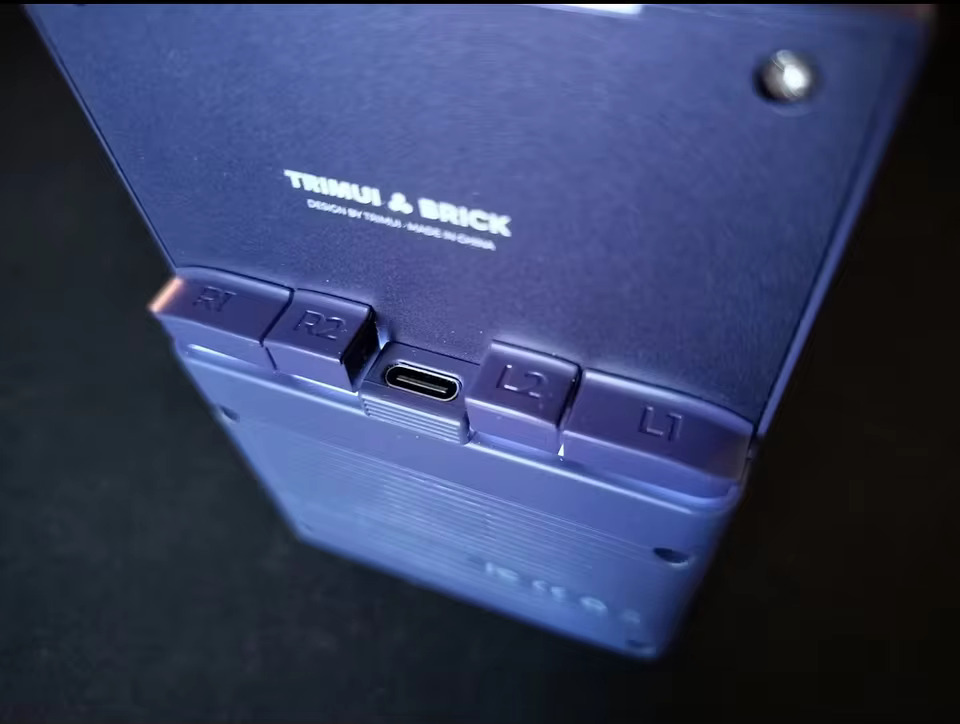
The shoulder setup is where the Brick tries something smarter than the norm. Each unit includes three different shoulder button styles, which lets you tune the shape and feel to your own grip. That is not a gimmick. It is a thoughtful nod to the fact that shoulder comfort is one of the most divisive issues in small handheld design. Internal link note: For a comparison of shoulder button ergonomics across budget handhelds, see our retro handheld ergonomics guide.
The clever part is real, but so is the fiddliness. If one button is seated just a little off, the feel changes immediately and the imbalance is surprisingly annoying. I had one shoulder cap sit a touch proud on one side, and the button felt mushier until I pulled it off and pressed it back in evenly from both corners. That kind of tiny setup friction is not hard to fix, but it is exactly the sort of thing new buyers do not expect from a device that otherwise feels so polished.
Pocket carry adds one more wrinkle. Because the shoulder caps are removable by design, they are easier to snag than fixed buttons. A crowded bag, a tight pocket, or a clumsy pull from a jacket can absolutely become the moment one of those caps decides to disappear into another dimension. You get spare shapes in the box, which softens the risk, but fixed buttons do not require this much trust.
L1 and R1 also sit a bit higher than natural finger placement for many adult hands, while L2 and R2 are small enough that they feel secondary in every sense. For classic systems this rarely matters. For games that actually ask you to use all four triggers with confidence, the shell reminds you that it was built for compactness first, ergonomic generosity second.
Trimui Brick Review: Performance and Emulation Range
The Trimui Brick performs very well where it is meant to. NES, SNES, Mega Drive, Game Boy, GBC, GBA, Neo Geo, arcade systems, and PS1 all sit comfortably within its wheelhouse. Those platforms not only run well, they look exceptional on this screen. If your personal retro library leans 2D, this device makes a very strong case for itself.
PS1 is especially satisfying here. The combination of sharp image output and a compact 4:3 panel gives many PlayStation games a cleaner presentation than you would expect from such a cheap handheld. GBA also benefits massively, with sprites and text looking far more refined than on lower-resolution budget screens. Internal link note: For our full retro emulation system compatibility guide, see our emulation library breakdown.
Can the Trimui Brick Play N64?
N64 is where expectations need a firm reset. Yes, the Brick can launch a chunk of the library. No, that does not make it a good N64 handheld. Performance varies from acceptable to compromised, audio can wobble, and some heavier games lose their appeal quickly once frame pacing starts to drift.
The bigger problem is control, not compute. N64 design expects analog movement, analog nuance, and camera handling that feels natural under a thumbstick. The Brick has no analog stick, and that changes the conversation from “can it run this” to “would you actually want to play this here.” I tried remapping a few titles just to see how far stubbornness could take me, and it felt a bit like trying to parallel park with oven gloves on. Technically possible. Not something I would recommend.
PSP follows the same basic pattern. Some lighter and more 2D-friendly games can work well enough, but this is not the sort of device you buy for serious PSP use. Once frame drops, heat, and missing analog input show up together, the limits stop being theoretical and become the whole experience.
Can you dock the Trimui Brick? Not in the way most buyers mean. This is not a little Switch alternative for TV play. It is a personal handheld, full stop.
Firmware and OS: Stock Is Functional, Custom Is Better
The stock OS is not a disaster. That already places the Brick above part of the budget field. You get a usable interface, system categories, search, favorites, emulator access, and enough structure to start playing quickly. For someone new to emulation handhelds, it works.
It also leaves obvious value on the table. CrossMix OS gives the Brick a more refined personality, with stronger customization, cleaner workflow, and better day-to-day usability. MinUI goes the opposite direction and strips things back to a faster, simpler, more focused experience. If you like a handheld to get out of your way, MinUI makes a lot of sense. If you like deeper tweaking, CrossMix is the better fit.
Most of the setup pain happens in the first hour, so this order saves a lot of grief:
- Flash your preferred custom firmware before you spend time building the library.
- Update the firmware environment, emulator cores, PortMaster metadata, and runtimes before testing ports.
- Confirm one known-good 2D system boots correctly before bulk-copying ROMs and art.
- If a port behaves strangely, launch it from the tools or file manager route first rather than assuming the game itself is broken.
- Keep a card reader nearby so an SD-card pull recovery is a thirty-second fix instead of a full evening detour.
The awkward bit is that the Brick can create software friction that feels random until you understand the pattern. Some ports behave badly, some need additional assets in the right folder, and some simply do not like the way a given firmware build handles launch routines. I have had moments where one title booted perfectly, the next black-screened, and the third loaded only after the launch path changed. That does not make the platform bad. It makes it hobbyist hardware, which is a different promise than “plug in and forget it.”
Architecture support matters too. Because the Brick is working within an ARM64 environment, not every port that behaves on another Linux handheld will cooperate cleanly here. That is why preloaded ports sound more exciting on a product listing than they feel at 11 p.m. when one title wants extra files, another needs a runtime update, and a third quietly refuses to start at all.
Sound, Battery, and Thermals
The front-firing stereo speakers are one of the Brick’s nicer surprises. Audio projects toward you rather than away from you, and that alone makes the device feel more considered than many rivals. Volume is strong enough for indoor use, and the general tonal balance is good for a handheld this size.
The Hammer shell adds a little extra acoustic body, and you do hear it. Sound effects and music have slightly more weight, which helps older systems with punchier soundtracks feel less thin. It is not night-and-day, but it is one of those differences you notice quickly once you have tried both.
Battery life is solid rather than spectacular. For 2D systems and PS1, you can expect a reliable medium-length session without anxiety. That is the good news. The less glamorous news is that thermals rise fast once you start poking at Dreamcast, N64, or PSP. The warm metal back turns into a useful honesty meter here. When the shell starts heating up, the device is basically telling you that you are leaving its comfort zone.
Trimui Brick vs Miyoo Mini Plus
The Miyoo Mini Plus is still the comparison that matters most because it defines the budget vertical category for many buyers. Both devices target roughly the same kind of player, but they go about it differently. The Miyoo wins on software maturity and lighter carry weight. The Brick wins on screen quality, processing headroom, and a more premium physical feel.
| Feature | Trimui Brick | Miyoo Mini Plus |
|---|---|---|
| Display Size | 3.2-inch IPS | 3.5-inch IPS |
| Resolution | 1024×768 | 640×480 |
| CPU | Allwinner A133P | Lower-clocked budget platform |
| RAM | 1GB LPDDR3 | Lower memory footprint |
| Battery | 3000mAh | 3000mAh |
| Shoulder Buttons | Interchangeable | Fixed |
| Analog Stick | No | No |
| Weight | Heavier, more substantial | Lighter, more pocket-friendly |
| Firmware Feel | Improving, less mature | More polished and established |
| Price | Budget | Budget |
The Miyoo Mini Plus still has the friendlier ecosystem if you want mature custom firmware and fewer setup surprises. The Brick has the better screen and the more upscale hardware feel, and that alone will be enough for some buyers to jump. If you already own a Miyoo and want a sharper panel with a sturdier shell, the Brick feels like a meaningful side-grade leaning toward upgrade. If you are buying your first handheld and want the smoothest community software path, the Miyoo still has an argument.
Pros and Cons
Pros
- Excellent 3.2-inch 1024×768 display with unusually high sharpness for the price
- Premium in-hand feel, especially with the metal-backed design
- Strong performance for 2D systems and PS1
- Interchangeable shoulder buttons are a genuinely inventive touch
- Front-firing speakers are better than expected
- Great value for buyers who want a compact daily-carry retro handheld
Cons
- No analog stick, which heavily limits N64 and PSP in real-world use
- Shoulder buttons remain ergonomically awkward despite the included swap options
- Small display can cause eye strain in text-heavy games and system menus
- Custom firmware is highly recommended, which adds setup work
- Port and firmware behavior can be inconsistent if you like to tinker beyond basic emulation
- Hammer version feels nicer, but the extra weight and heat are not free upgrades
Who Should Buy the Trimui Brick?
The right buyer for this handheld is someone who cares about the 2D library first and wants a compact device that feels a cut above the usual budget tier. If your ideal evening is GBA, SNES, Mega Drive, arcade games, and PS1 on a very sharp little screen, the Brick is easy to recommend.
The wrong buyer is someone shopping for broad 3D coverage, long-form ergonomic comfort, or a totally frictionless tinkering experience. This is still a budget retro handheld, not a miracle in a pocket. It just happens to be one of the best-shaped miracles this price class has managed recently.
The Hammer version makes sense if you value build feel and slightly fuller sound more than absolute carry ease. The standard version is the smarter all-rounder for most people because it keeps more of the Brick’s charm without leaning as hard into the weight and thermal trade-off.
Conclusion
The verdict on the Trimui brick is straightforward. This is one of the most appealing budget vertical handhelds of 2026 for players focused on 2D systems and PS1, and it earns that status through a combination of screen quality, build feel, and sensible core performance. It does not truly solve N64 or PSP, it does not escape the ergonomic limits of a compact vertical shell, and it benefits a lot from custom firmware on day one.
Even with those caveats, the Brick gets the important things right. It feels better than it should at this price, looks sharper than almost anything near it, and turns classic systems into a genuinely polished portable experience. If your library matches its strengths, this trimui brick review ends in a simple answer: yes, it is one of the best budget vertical handheld buys you can make right now.