
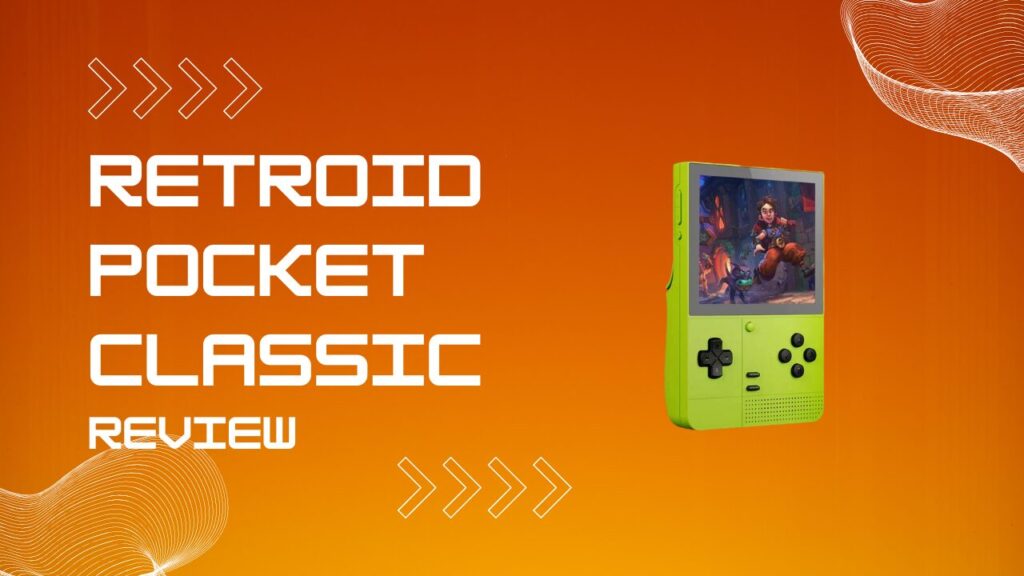
Retroid Pocket Classic Review is one of those keywords where the answer gets clearer the moment you stop treating this handheld like a generic spec sheet. This device pairs a Snapdragon G1 Gen 2 platform with a sharp AMOLED display, a vertical shell, and a layout that is clearly built around retro-first play instead of trying to be all things to all people. I think that focus is the whole appeal, and it is also why this machine makes more sense the longer you stare at it.
Key Takeaways
- The Retroid Pocket Classic is a premium vertical Android handheld that makes the strongest case for itself with Game Boy, Game Boy Color, GBA, PS1, arcade libraries, and a useful slice of Dreamcast.
- The AMOLED screen is the star of the show, and it does a lot of heavy lifting in making older games look richer than they have any right to on a device this small.
- The chipset is capable enough that performance is rarely the real bottleneck. Controls, aspect ratio, emulator setup, and game-specific compatibility matter more.
- The device is at its best when you treat it like a modernized Game Boy with headroom, not a pocket-sized answer to every emulator under the sun.
- If you want dual sticks, easy TV play, and more comfort for stick-heavy systems, another Retroid probably fits better.
Retroid Pocket Classic Review Verdict
The Retroid Pocket Classic is best understood as a premium vertical retro handheld, not a tiny everything-machine. Its hardware stack gives you enough power for far more than 8-bit nostalgia, but the layout keeps nudging you back toward the systems that actually feel right in your hands. That is good product design, not a limitation dressed up as one.
The value proposition is strongest for players who care about screen quality, d-pad comfort, and a Game Boy-shaped silhouette more than they care about maxing out every emulator. It feels like Retroid picked a lane and stayed in it, which is more discipline than this category usually shows. I like that, because too many handhelds chase flexibility and end up feeling vague.
The audience fit is narrower than the hype cycle suggests, but that is not a flaw. If you mainly want Game Boy, Game Boy Color, GBA, PS1, older arcade libraries, and a meaningful slice of Dreamcast in a vertical shell, this thing is very easy to justify. If you want a more general Android emulation slab with broader control flexibility, read my Retroid Pocket 5 review for players deciding whether a larger OLED screen and dual sticks matter more than vertical nostalgia.
Pros And Cons
Pros
- Beautiful AMOLED screen that instantly makes retro games feel more premium.
- Strong retro-first identity, with a vertical shell and controls that suit handheld-era libraries.
- Enough processing headroom for a lot more than basic emulation.
- Good value if your real goal is a premium stickless handheld instead of a do-everything machine.
- Color options have actual personality instead of looking like afterthoughts.
Cons
- No-stick design limits how enjoyable some N64, Dreamcast, Android, and higher-end systems feel.
- The 31:27 display is gorgeous, but it still means some content will live with borders.
- Android setup is more flexible than Linux handhelds, but also easier to misconfigure.
- This is not the handheld I would buy primarily for docked TV play.
- Long sessions can still expose the usual vertical-handheld ergonomics trade-offs.
Design And Display
The design is the Retroid Pocket Classic’s biggest differentiator because the body leans hard into old-school handheld ergonomics while still carrying modern internals. It looks like a machine that wants to replay your childhood, but the finish, screen, and overall presentation push it past toy-like nostalgia and into proper enthusiast hardware. That matters, because a premium retro handheld should feel intentional the second you pick it up.
The screen is not just a bullet point, it is the reason the device feels premium. AMOLED gives the Pocket Classic the contrast and punch that retro pixel art loves, and the panel is good enough that black bars often fade into the background instead of screaming at you. In my experience, I stop caring about unused screen space pretty quickly on OLED, but I notice it the moment I jump between handheld-native systems and something wider in the same session.
The control layout also tells you what Retroid thinks the product is for. The absence of front sticks keeps the face clean and makes the whole device look far better, but it also quietly tells you not to force systems that were built around analog movement and camera control. I have found that this kind of layout makes me play more Game Boy and less “technically it runs, so I guess I should” content, which is honestly a healthier use of a handheld like this.
The six-button Classic 6 variant is more interesting than it first appears. That extra face-button flexibility makes Sega fighters, arcade titles, and specific retro control schemes feel less compromised, which is the kind of detail that separates design flair from design intent. If your shortlist includes compact alternatives with a different shape and control philosophy, my Retroid Pocket Mini review for anyone comparing compact premium Retroid hardware with a very different screen shape and control philosophy is the better parallel read.
Chipset, Processor, And Performance
The Retroid Pocket Classic hardware story starts with a capable Snapdragon chip and enough memory to stop this from feeling like a pretty shell wrapped around bargain-bin internals. That foundation matters because it gives the device the horsepower to move beyond entry-level retro systems without asking you to baby every emulator setting. The result is a handheld with real headroom, even if the form factor wisely keeps your expectations in check.
Retroid Pocket Classic performance looks better when you read the whole package instead of obsessing over a single benchmark. Raw power matters, but perceived speed on Android also depends on how heavy your frontend is, how many shaders you pile on, whether you are syncing files in the background, and how disciplined you are with emulator settings. I have seen plenty of capable handhelds feel worse than they are because the owner tried to turn every menu into a visual effects demo.
That is why this processor feels more convincing in context than on a spreadsheet. The Classic is fast enough for the systems most people should actually play on it, and it avoids the much uglier problem of pairing a beautiful device with performance that feels cheap. The trick is to stay inside the product’s lane, because once you start treating a stickless vertical like a widescreen performance monster, the controls become the friction point before the chipset does.
Thermals are also part of the real performance story. Active cooling helps keep the handheld from feeling overmatched, but I would still rather run this machine in a sane performance profile than chase tiny gains that add noise and eat battery. If your real goal is to squeeze more headroom out of demanding systems and you care less about a vertical shell, my Retroid Pocket 4 Pro review for readers who care more about emulator headroom than a pure Game Boy-style form factor is the more relevant comparison.
GBA, Dreamcast, And Real-World Emulation
GBA on Retroid Pocket Classic should be a major part of the buying conversation because the device feels spiritually aligned with Nintendo’s handheld lineage. The screen quality does a huge amount of work here, and the vertical form factor makes these libraries feel like they belong on the hardware rather than merely functioning on it. This is the kind of device that can turn a quick test of one GBA game into a late-night spiral through your entire favorites list.
Dreamcast is where the machine gets more interesting than the shell suggests. It has enough power to make Dreamcast feel like a real feature instead of a marketing flex, but the control layout still asks you to be selective about what you play and how you map it. I would happily use it for the right Dreamcast games, but I would not pretend that a stickless vertical is the ideal home for every game on that system.
The real trick with this handheld is matching the platform to the control scheme, display shape, and setup overhead. If you do that, it feels excellent. If you ignore it, you will end up blaming the hardware for choices that were really about fit.
| Use Case | Why It Works | Friction To Expect | Best Setup Move |
|---|---|---|---|
| GB and GBC | The vertical shape and OLED screen make these games feel almost purpose-built for the device. | Optional BIOS files and shader experimentation can send new users down a rabbit hole. | Start simple, use a clean core first, then add overlays or shaders later. |
| GBA | Strong fit for screen quality, handheld ergonomics, and quick-session play. | Aspect preferences can vary, and some users will over-tune filters before they even test the game. | Play a few games at stock settings, then decide whether you actually need visual tweaks. |
| PS1 and Saturn-era 4:3 content | Enough performance and a strong screen make these systems very comfortable here. | Shoulder-heavy games can remind you that this is still a compact vertical. | Map controls carefully and avoid copying layouts blindly between emulators. |
| Dreamcast | The chipset has enough muscle to make Dreamcast worthwhile. | Game-by-game control comfort matters more than raw compatibility. | Use a Dreamcast emulator with sane defaults first, then fine-tune only when a specific game needs it. |
| Android games and stick-heavy systems | Android opens the door to a much larger library. | Built-in controls and chipset-specific quirks mean not every game is a smooth fit. | Check compatibility first and treat support as title-specific, not automatic. |
Emulation setup is also where the difference between experienced Android users and everyone else becomes obvious. Android gives you flexibility, but it also expects you to manage folders, BIOS files, app choices, and frontend behavior with a little more intention than simpler Linux handhelds. I have watched more people blame a handheld for missing BIOS files than for actual performance limits, and that pattern absolutely applies here.
Software, Battery, And Everyday Use
Android is one of the Pocket Classic’s biggest strengths because it gives you access to a much broader software ecosystem than the average budget retro device. That means better emulators, more frontends, more utility apps, and more ways to shape the experience around your own habits. It also means the setup process can feel a bit like being handed a really capable toolbox without anyone labeling the drawers.
The BIOS and ROM folder workflow is a perfect example of that trade-off. Once your directory structure is clean, Android can feel wonderfully flexible, but the first hour can be more fiddly than newcomers expect. In my experience, the fastest way to ruin your first impression of an Android handheld is to dump files everywhere, forget what belongs where, and then spend the evening pretending the device is the problem.
Hotkey behavior is another small annoyance that turns into a real quality-of-life issue if you ignore it. On a stickless handheld, you need to think a little harder about how you want save states, fast forward, menu access, and emulator shortcuts to work, because there is no universal magic layout that feels perfect for every system. I usually sort this out early, because a great d-pad cannot save a handheld from sloppy shortcut planning.
Battery life and charging look comfortably modern on paper, and that is exactly what you want here. The device feels more premium because it does not force you into old-fashioned charging habits or constant anxiety about topping up after every longer session. That part is easy to appreciate because it fades into the background, which is where good battery behavior belongs.
Fan behavior deserves a quick reality check within the flow of normal use. This is not a machine that feels desperately hot in standard play, which is good, because I found the whole experience more pleasant when I was not tempted to micromanage cooling. In a quiet room, a faint high-pitched fan note is the kind of thing I notice once and then cannot unhear, so I would rather run a sensible profile than chase a tiny performance edge I do not need.
Android game compatibility is also broader than many buyers will expect, but not every Play Store game is automatically a good fit. Some titles run into control limitations, while others simply behave oddly on a newer Snapdragon-based handheld until the app catches up. That is why I see the Android layer as a bonus that expands the device, not the main reason to buy it.
Colors, Price, UK, And Ship Date
Pricing is one of the Retroid Pocket Classic’s strongest arguments because it does not carry the usual premium-vertical tax you might expect. The whole package feels more expensive than the entry point suggests, and that helps it stand out in a market where nostalgia often gets used as an excuse for weak value. Retroid was smart not to overprice the aesthetic.
The variant structure matters more than casual buyers think. Once colors, memory tiers, and special layouts enter the picture, a cheap-looking base price can quickly become a specific configuration discussion. That is normal, but it does mean you should decide whether your real priority is the colorway, the extra RAM and storage, or the six-button setup before you hit checkout.
Retroid Pocket Classic UK buyers should also think beyond the listed price. Import costs, shipping, and local taxes can change the value equation quickly, so the sensible move is to price the handheld as landed cost, not wishful cost. I always do that with retro hardware because the fantasy bargain in your basket is not the same thing as the number that lands on your statement.
Color choice is part of the fun here, and that is not trivial. Berry, Kiwi, Purple-style nostalgia, and the more retro-coded options all sell the personality of the device in a way that plain hardware often fails to do. If you are searching for a black version, you are basically trying to turn a playful handheld into a stealth one, and that is not really what this product wants to be.
This is also where I would keep expectations practical about docked play and TV use. Even if a product listing makes that capability sound available, this is not the device I would buy as my couch-to-TV solution because the handheld-first experience is clearly where the design effort went. If you want a broader family comparison that leans harder into value and upgrade logic, my Retroid Pocket 4 review that explains the older model’s value proposition for budget-conscious Retroid buyers will help frame the trade-offs.
FAQ
Is The Retroid Pocket Classic Good For GBA?
The Retroid Pocket Classic is a very sensible GBA handheld because the screen quality, form factor, and quick-session comfort all point in the right direction. It feels like one of the cleanest matches between hardware identity and software library in the current retro handheld space.
Can The Retroid Pocket Classic Run Dreamcast Well?
Yes, with taste. Dreamcast is one of the more interesting features of this device, but the games you choose and the control demands of those games matter just as much as raw emulator compatibility.
What Chipset Does The Retroid Pocket Classic Use?
It uses a Snapdragon G1 Gen 2 platform, which is a big reason the device feels far more serious than a lot of cheaper vertical handhelds.
What Processor Is In The Retroid Pocket Classic?
The processor is a Snapdragon G1 Gen 2. In practical terms, that means the device has enough performance to feel comfortable well beyond the lower-end retro systems that its shape initially suggests.
What About Retroid Pocket Classic AnTuTu?
Retroid Pocket Classic AnTuTu is a common search, but I would not make this purchase based on one benchmark number. The better question is whether the screen, control layout, thermals, and emulator fit line up with the systems you actually plan to play.
Is There A Retroid Pocket Classic Berry, Kiwi, Or Purple Version?
Yes, and those colorways are part of the appeal. This is a device that benefits from having a bit of personality, because the whole design is built around nostalgia with a cleaner finish.
Is The Retroid Pocket Classic Worth Buying In The UK?
It can be, but only after you include shipping and import costs. The device still makes sense if you specifically want a premium vertical Android handheld, but the value case is weaker if your local total gets too close to stronger all-round alternatives.
What Is The Retroid Pocket Classic Ship Date?
The launch window is already old news at this point, so the more useful question is retailer availability and color-specific stock. If you are shopping now, check the exact seller, exact color, and exact configuration instead of relying on generic launch-era timing.
Is A Retroid Pocket Classic Teardown Important Before Buying?
Only if repairability or modding potential is your personal deal-breaker. For most people, the more useful buying criteria are display quality, control layout, Android setup overhead, and whether the systems they care about actually suit a stickless vertical handheld.
Final Verdict
Retroid Pocket Classic Review comes down to fit, not hype. This handheld succeeds because it knows what it is, a premium vertical Android device with a beautiful screen, enough power to feel modern, and just enough restraint to avoid becoming another messy all-rounder. I would buy it for Game Boy, GBA, PS1, and selective Dreamcast nostalgia with modern flexibility, but I would skip it if my priority were maximum stick-friendly versatility or a better TV-connected setup.