The Anbernic RG35XX review I kept putting off writing finally has to happen, because this device is genuinely strange to evaluate fairly. On one hand, it is a cheap, pocketable slab of plastic that runs thousands of retro games with a sharp screen and better battery life than you would expect. On the other hand, the stock firmware is rough in places, the base model skips WiFi, and a surprising amount of user frustration starts with the microSD card rather than the handheld itself.
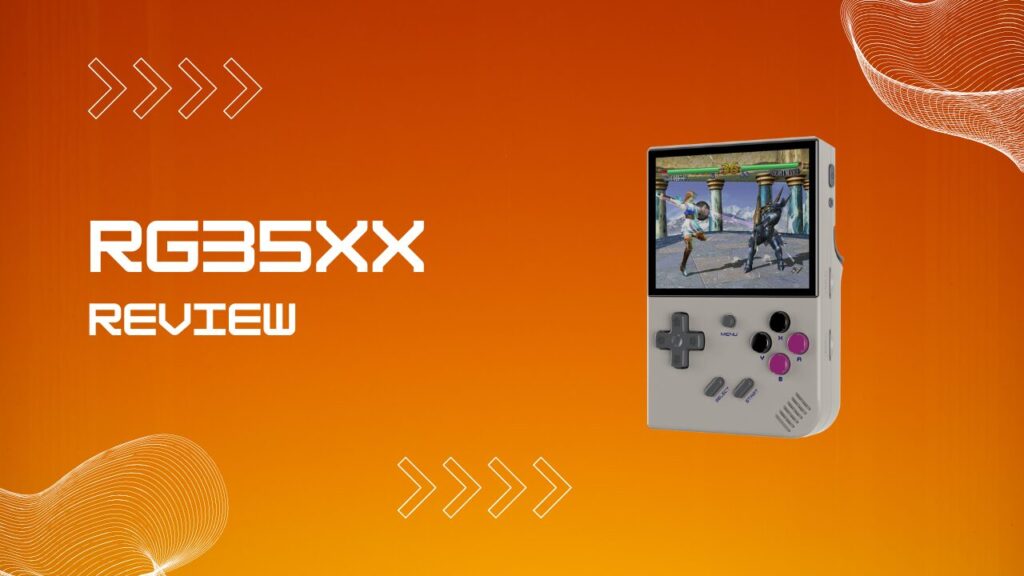
So, is the Anbernic RG35XX worth it? Yes, with a few conditions. This review covers the hardware, emulation ceiling, custom firmware options, troubleshooting, and whether the base RG35XX still makes sense in 2026.
Key Takeaways
- The Anbernic RG35XX is a budget Linux handheld with a 3.5-inch 640×480 IPS display, an H700 chip, and enough power for classic systems up to PS1 with some N64 headroom.
- It is at its best with NES, SNES, Genesis, Game Boy, GBA, arcade, and PS1. PS2 and GameCube are not realistic targets here.
- GarlicOS, MinUI, and Knulli each solve different problems, and your best pick depends on whether you want simplicity, speed, or features.
- Most reports of the RG35XX not turning on, freezing, or boot-looping come back to charging mismatch, a weak cable, or a flaky microSD card.
- The base RG35XX is still good value, but the RG35XX Plus is the smarter buy for most people if the extra cost is small.
RG35XX Specs: What You Are Actually Getting
The Anbernic RG35XX is built around the Allwinner H700 processor, a quad-core ARM Cortex-A53 chip running at 1.5GHz, paired with a Mali-G31 MP2 GPU and 1GB of LPDDR4 RAM. Those numbers are modest by 2026 standards, but they line up well with what this handheld is actually meant to do. The real limit is not the CPU name on the spec sheet, it is the fact that 1GB of RAM and this class of GPU put a hard ceiling on heavier 3D systems.
The display is a 3.5-inch IPS panel at 640×480, which is still a sweet spot for retro gaming because integer scaling and classic aspect ratios behave nicely on it. The screen looks crisp, colors have enough pop, and text in handheld systems stays readable without you squinting like it is 1998 again. I was pleasantly surprised by how little this panel feels like a compromise in day-to-day use.
The battery is 2600mAh and generally lands around 6 to 7 hours depending on system and brightness. The annoying bit is not the battery life itself, it is the charging behavior. This line can be picky with modern USB-C fast chargers, and in my experience the handheld can look completely dead when the real issue is a charger that negotiates the wrong power profile. Use a basic USB-A to USB-C cable and a plain 5V/1.5A brick, and a lot of fake “won’t turn on” drama disappears.
Storage runs through dual microSD slots, with support up to 512GB total, and that matters more than it sounds because the card quality can make or break the whole experience. If your unit came with a decent branded card, you are in better shape. If it came with a generic black card, I would treat that as temporary from day one. I have seen more time wasted chasing “firmware issues” that were really bad cards than actual software faults.
The other thing worth knowing is that upgrading your firmware card is not a simple copy-and-paste job. These cards use multiple partitions, so dragging files from the stock card to a fresh card will often leave you with a handheld that boots to nowhere. That catches new owners all the time, especially people who assume this works like moving ROMs to a USB stick.
The base 2024 model includes no WiFi or Bluetooth, but mini HDMI output is present, and you can use wired or 2.4GHz controller setups through the USB-C side. That keeps the spec sheet functional, if not generous.
| Spec | Detail |
|---|---|
| CPU | Allwinner H700 Quad-Core ARM Cortex-A53, 1.5GHz |
| GPU | Mali-G31 MP2 |
| RAM | 1GB LPDDR4 |
| Display | 3.5-inch IPS, 640×480 |
| Battery | 2600mAh, around 6 to 7 hours |
| Storage | Dual microSD slots, up to 512GB total |
| Connectivity | USB-C, mini HDMI, wired and 2.4GHz controller support |
| Wireless | No WiFi or Bluetooth on the base model |
| Operating System | Linux |
| Weight | 186g |
| Typical Price | Around $35 to $45 |
What Consoles Can the RG35XX Emulate?
The RG35XX earns its reputation on the systems that matter most to retro players. NES, SNES, Genesis, Game Boy, Game Boy Color, Game Boy Advance, arcade boards, and PlayStation 1 all sit comfortably in its wheelhouse. This is where the device feels easy and natural, not strained.
PS1 is especially good here, because the screen suits it, save states are fast, and most games feel right at home on a small handheld. That matters more than benchmark talk. A handheld like this lives or dies on whether you actually want to pick it up for twenty minutes and lose an hour.
Nintendo 64 is where expectations need trimming. Some lighter or better-optimized games are fine, but this is not a machine for deep N64 confidence. If your personal test is Super Mario 64, you may come away impressed. If it is Rogue Squadron or one of the rougher edge cases, you will come away annoyed.
Systems That Usually Run Very Well
- NES and Famicom
- SNES and Super Famicom
- Game Boy, Game Boy Color, and Game Boy Advance
- Sega Master System and Genesis
- PC Engine and TurboGrafx-16
- Neo Geo and many arcade sets
- PlayStation 1
- Nintendo DS in a limited, usability-first way
- DOS and ScummVM for selected titles
Can the RG35XX Play PS2 or GameCube?
The RG35XX cannot play PS2 or GameCube in any way that makes sense for normal use. That answer is still simple, even if marketplace listings and social posts keep trying to blur it. The hardware is nowhere near that class.
This is one of those places where bad keyword space creates bad expectations. People search “rg35xx gamecube” or “rg35xx ps2” and assume the question exists because the feature might exist. It does not. If PS2, GameCube, or even dependable PSP is your goal, you are shopping in the wrong part of the handheld market.
Custom Firmware: GarlicOS, MinUI, and Beyond
The stock operating system is usable, but the RG35XX becomes far more interesting once you swap firmware. Custom software changes how the device boots, organizes games, handles scraping, exposes emulator settings, and in some cases makes the whole unit feel more polished than the stock experience ever manages.
There is also a practical reason to care about firmware choice. Stock builds on this line have had periods where users noticed microstutter in otherwise easy systems, especially inside RetroArch. When you feel tiny frame pacing hiccups in games that should be effortless, the problem often is not the chip. It is the software stack wrapped around it. I have had games feel subtly “off” on stock firmware, then immediately settle down once moved to a better-maintained setup.
GarlicOS for the RG35XX
GarlicOS is the obvious recommendation for people who want the RG35XX to feel more complete without turning setup into a hobby. It adds a cleaner interface, better organization, stronger shortcuts, and a more enthusiast-friendly overall flow. It is the firmware that makes the hardware click for a lot of people.
GarlicOS also makes the handheld feel less toy-like and more intentional. Menus are cleaner, game hopping is faster, and the device finally feels like it knows what it wants to be. If you buy the RG35XX and leave it on stock forever, you are not seeing the hardware at its best.
MinUI for the RG35XX
MinUI is for people who want the handheld to disappear and let the games do the talking. It strips away box art, visual clutter, and almost all decorative noise. Boot it, pick a game, play the game, stop overthinking it.
The friction point is that MinUI is simple on the surface, but it expects you to respect its structure. It is happiest in a two-card setup, and it has been designed around a very particular logic for where the OS and ROM content live. I like MinUI a lot, but I have also watched people bounce off it because they assumed “minimal” meant “forgiving.” It is minimal, not careless.
Knulli, muOS, and Other Options
Knulli goes in the opposite direction and gives you a more modern console-like frontend, richer metadata, and a visually nicer browsing experience. It is attractive, feature-rich, and far more polished-looking than stock. If you want media scraping, better presentation, and a frontend that looks like someone actually cared about it, Knulli is compelling.
The catch is that Knulli introduces file-system choices that confuse Windows and Mac users almost immediately. Its default share partition behavior can push you into EXT4 territory, which is fine if you know what that means and irritating if you do not. Reformatting to exFAT makes drag-and-drop easier, but it can reduce compatibility with some extras and ports. That is the kind of detail advanced users shrug at and beginners absolutely trip over.
muOS is another strong option, especially if you like speed and control. It boots quickly and gives tinkerers more room to shape the experience. I would not call it the easiest starting point, but I would call it rewarding if you are the type who enjoys sanding the rough edges off your own setup.
| Firmware | Best Trait | Main Tradeoff | Best For |
|---|---|---|---|
| GarlicOS | Balanced and polished | Less minimal than MinUI | Most users |
| MinUI | Fast and focused | Less forgiving setup structure | Players who want simplicity |
| Knulli | Rich frontend and scraping | More setup friction, file-system nuance | Users who want features |
| muOS | Fast and flexible | More tinkering | Advanced users |
| Stock OS | Ready out of the box | Rough UI, weaker refinement | Casual first boot use |
RG35XX Build Quality and Design
The RG35XX feels like a budget handheld that was designed by people who understood where the money should go. The plastic shell is light, the overall shape is pocket-friendly, and the screen does far more heavy lifting than the price suggests. It does not feel premium, but it does feel appropriately built.
The D-pad is good enough to matter, though it is not perfect. Some users have reported it being a little touchy on diagonals or drifting into an unintended direction on certain units, and I can see why that comes up. Mine did not feel broken, but it did feel a bit eager in games where precision matters. That is not a deal-breaker, just something you notice once you stop testing menus and start playing platformers.
The face buttons are decent, with enough travel to feel satisfying. The shoulder buttons are the weaker point, and that becomes clearer the longer you use the device. They are not awful, but they never stop reminding you where the budget went.
The screen is the part that overdelivers. The full laminated look helps the image sit nicely without that cheap floating effect some budget handhelds still have. A little light bleed can show up on some units, but the panel itself is one of the biggest reasons this device keeps getting recommended.
RG35XX Not Turning On: Troubleshooting Guide
The most common RG35XX support issue is some variation of “it will not turn on,” and the good news is that this usually points to something boring rather than something catastrophic. Most failures come back to power delivery, SD corruption, or a firmware image that was written incorrectly.
The part that catches people is that the symptoms blur together. A dead battery, a bad cable, a failing card, and a corrupted operating system can all produce the same lifeless startup behavior. That is why random button mashing rarely helps. A clean order of operations does.
Startup Troubleshooting Checklist
| Symptom | Likely Cause | Fastest Fix | What Usually Solves It |
|---|---|---|---|
| No light, no boot, no vibration | Wrong charger or weak cable | Switch to USB-A to USB-C and a 5V/1.5A charger | Charge for 10 to 15 minutes, then retry |
| Power light appears, then nothing | Corrupt OS card | Remove SD, test or replace card, reflash firmware | Fresh branded microSD and clean image |
| Stuck on logo or loading screen | Card corruption or bad flash | Back up files, reformat, reflash | New card if the old one is generic |
| Random freezes during use | Stock OS instability or poor card health | Try another card or different firmware | GarlicOS, muOS, or a clean stock install |
| Boots handheld screen but not TV | HDMI handshake issue | Connect at menu or reboot with cable attached | Retry at main menu, not during gameplay |
Start with the boring stuff. Hold the power button for 10 to 15 seconds for a full shutdown, then try a normal boot. After that, swap the cable and charger. The charging spec matters more here than on modern phones, and I have seen this handheld reject perfectly good high-wattage chargers simply because the negotiation was wrong.
If the unit still refuses to boot, the microSD card becomes suspect immediately. This is the point where a lot of owners burn an hour troubleshooting the device when they should really be replacing the card. A quality Samsung or SanDisk card is not glamorous, but it solves an absurd amount of RG35XX drama.
Fixing the RG35XX Boot Loop
A boot loop usually means the operating system card has become unstable or corrupted. That can happen after a bad shutdown, a weak bundled card, or an incomplete firmware flash. It looks like a hardware death spiral, but in many cases it is just storage failure wearing a dramatic costume.
Back up anything you can still read from the card, then stop trusting that card if it is generic. Reformat, flash a clean firmware image, and test again. If the device suddenly becomes reliable on a fresh branded card, you have your answer.
How to Factory Reset the Anbernic RG35XX
A factory reset on the RG35XX is really a reflash, not a menu option buried in settings. That matters because people expect a smartphone-style reset and end up searching menus for something that does not exist.
Use a clean firmware image, write it properly with a flashing tool, and let the device rebuild what it needs on first boot. If you rush that first startup or interrupt it because the screen seems idle, you can create the same mess you were trying to fix in the first place.
How to Use the RG35XX: Tips, Shortcuts, and Cheats
The RG35XX is easy to operate once you know where the useful shortcuts live. Out of the box, it can feel like a simple handheld with a few buried menus. After a week, it starts to feel more like a small emulation workstation you can run with muscle memory.
Useful Everyday Shortcuts
- Exit game to menu: Menu + Start
- Save state: Menu + R1
- Load state: Menu + L1
- Fast-forward: Menu + R2
- Screenshot: Menu + X
- Emulator menu: Menu + A or Menu alone, depending on firmware
Cheats run through RetroArch on most common setups, so the process is familiar if you have used emulation handhelds before. Load the game, open the emulator menu, find the cheats section, and load the matching cheat file. The only real annoyance is file naming. If your ROM name is messy, mismatched, or pulled from a random bundle, cheat matching can become more stubborn than it needs to be.
HDMI output works, but this is another area where the RG35XX likes to be slightly fussy. The most reliable routine is to connect the cable while you are at the main menu, not in the middle of a game, and reboot if the display handshake fails. I have had setups where the handheld seemed broken on a TV, only to behave perfectly once I stopped hot-plugging it like a modern console.
Adding ROMs is easy once the card layout is sane. Put files in the correct system folders, keep naming clean, and do not assume every custom firmware uses the same folder structure. That sounds obvious until you switch OS builds and wonder why one firmware sees your library and another acts like your card is empty.
RG35XX Pros and Cons
The RG35XX is easy to recommend, but it is not hard to critique either. That is usually a good sign in a budget product, because it means the device has a clear identity instead of pretending to be everything.
Pros
- Excellent value for 8-bit, 16-bit, arcade, and PS1 gaming
- Sharp 3.5-inch IPS display with a retro-friendly resolution
- Very pocketable and light
- Strong custom firmware ecosystem
- Easy to enjoy in short sessions
- Dual microSD slots make experimentation easier
Cons
- Base model has no WiFi or Bluetooth
- Bundled microSD quality can be the weakest part of the whole package
- D-pad sensitivity can vary by unit
- Stock OS feels unfinished next to community firmware
- N64 is inconsistent, and PS2 or GameCube are not realistic
- Charging behavior can be fussy with modern fast chargers
RG35XX vs RG35XX Plus: Which Should You Buy?
The RG35XX and RG35XX Plus are close enough in spirit that people often overthink the decision. Performance is not the real separator. Convenience is.
The Plus gives you built-in wireless features and a larger battery, which sounds minor until you actually live with both devices. WiFi makes scraping, updates, achievements, and controller pairing much less clumsy. A bigger battery gives you more margin for travel and fewer weird low-power moments. It is not flashy, but it is practical.
The base RG35XX still makes sense if price is the whole point or if you specifically want the lighter, simpler unit. For most buyers, though, the Plus is the version I would choose unless the price gap is unusually wide.
| Feature | RG35XX | RG35XX Plus |
|---|---|---|
| Chip | H700 | H700 |
| Screen | 3.5-inch IPS, 640×480 | 3.5-inch IPS, 640×480 |
| RAM | 1GB LPDDR4 | 1GB LPDDR4 |
| WiFi | No | Yes |
| Bluetooth | No | Yes |
| Battery | 2600mAh | 3300mAh |
| Best Fit | Cheapest entry point | Better long-term buy |
RG35XX Review Verdict: Is It Worth the Money?
This Anbernic RG35XX review lands in a pretty clear place. Yes, it is worth it if your goal is classic handheld and console emulation up through PS1, with a bit of N64 experimentation on the side. In that lane, it is still one of the best-value handhelds around.
What keeps it from being an automatic no-notes recommendation is not the screen or the chip. It is the friction around charging, bundled storage, and stock software polish. None of that is fatal, but all of it is real. I would still recommend it, I would just recommend it with a good SD card, sensible charger, and realistic expectations.
If you want the cheapest route into pocket retro gaming, the base RG35XX still earns its place. If you can spend a little more, the Plus is easier to live with. Either way, the RG35XX review verdict is simple: this handheld is good at the things it was actually built to do, and that is the standard that matters.