The Trimui Smart Pro review community has been vocal for two years now, and the consensus gets harder to argue with every time I revisit it: this device does more for the price than it has any right to. Released in mid-2023, it carved out a loyal user base not by chasing specs or loading the box with gimmicks, but by being genuinely affordable, easy to set up, and capable of running a surprisingly broad slice of retro gaming history.
That said, a flat “just buy it” verdict would be doing you a disservice. This device has a hard ceiling, and if the systems above that ceiling are your priority, you will walk away frustrated. This review covers the full picture: what it can play, what it cannot, how to fix the most common problems, and whether it still holds up as a purchase in 2025.
Key Takeaways
- The Trimui Smart Pro is a budget Linux-based handheld (~$45-60) powered by the Allwinner A133 Plus (TG5040) SoC.
- It handles everything up to PSP and Dreamcast, with PS1, GBA, SNES, and NES running flawlessly on stock firmware.
- GameCube and PS2 emulation are not viable on this hardware, regardless of settings or custom OS.
- CrossMix OS is the community’s essential custom firmware and transforms N64 performance in particular.
- The 4.96-inch 720p IPS display and 5,000mAh battery are genuine highlights for the price bracket.
- Firmware v1.0.4 and later adds Bluetooth audio, improved Vulkan blob support, and DOSBox compatibility.
- A successor, the Trimui Smart Pro S, launched in late 2025 with approximately 2.5x GPU improvement and an open-source Mali GPU.
- Factory reset requires a recovery SD card created from the official GitHub firmware image.
What Is the Trimui Smart Pro?
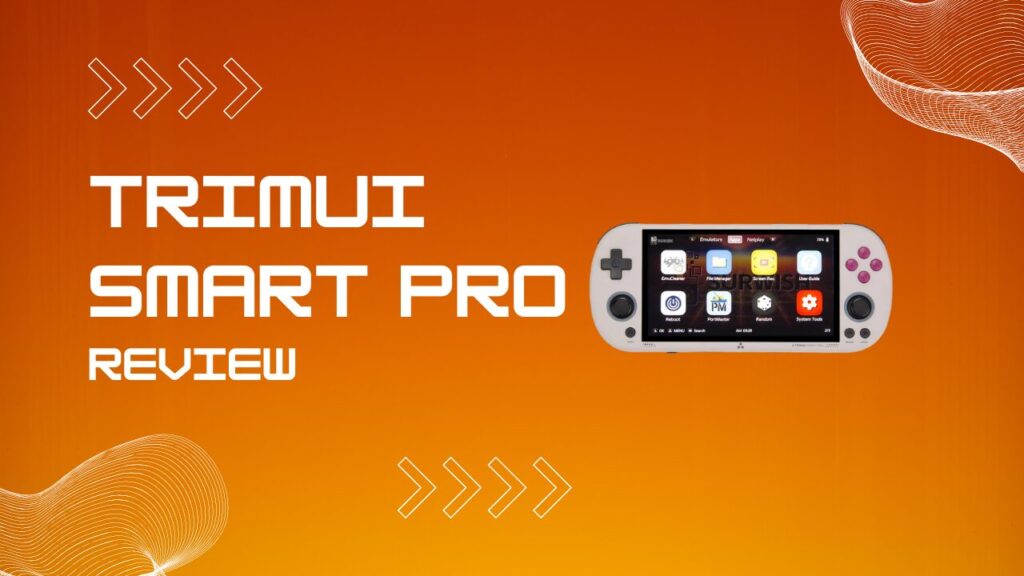
The Trimui Smart Pro is a horizontal-form, Linux-based handheld gaming console designed for retro game emulation. Manufactured by Trimui, a Chinese electronics outfit, it sits at the budget end of a crowded market that includes devices like the Miyoo Mini Plus and the Anbernic RG35XX H. Unlike many competitors in the same price bracket that use a vertical “brick” layout, the Smart Pro opts for a traditional landscape gamepad shape, which makes longer gaming sessions considerably more comfortable.
Out of the box, the device runs a custom Linux-based stock OS with a curated RetroArch core library pre-installed. You can be playing PS1 games within 10 minutes of opening the box, which is a significant part of the appeal. The full device identifier in firmware files is the TG5040, which cross-references the Allwinner A133 Plus chipset internally.
Trimui Smart Pro Specs: The TG5040 Chipset Explained
The Trimui Smart Pro’s performance profile is almost entirely defined by its SoC. Understanding the chip tells you exactly what to expect before you spend a penny.
| Specification | Detail |
|---|---|
| SoC | Allwinner A133 Plus (TG5040) |
| CPU | 4x ARM Cortex-A53 @ 1.8 GHz |
| GPU | PowerVR GE 8300 @ 660 MHz |
| RAM | 1GB LPDDR4x |
| Display | 4.96-inch IPS, 1280×720 (720p) |
| Battery | 5,000 mAh (approx. 4-6 hours) |
| Storage | 8GB eMMC + MicroSD (64GB card included) |
| Connectivity | WiFi 5, Bluetooth (firmware v1.0.4 and later) |
| OS | Linux-based (Stock OS or CrossMix OS) |
| Charging | USB-C |
| Firmware ID | .awimg format (TG5040) |
The PowerVR GE 8300 GPU is the component that sets the emulation ceiling, and it has a specific trait that most budget handheld roundups skip: the PowerVR GE 8300 uses closed-source driver blobs maintained by Imagination Technologies, not the wider open-source community. When something breaks at the driver level, community firmware developers cannot patch it the same way they can with Mali or Adreno GPUs found in competing devices. The Vulkan implementation on this specific chip has documented push-constant handling bugs that affect rendering correctness in certain applications. Firmware v1.0.4 updated the Vulkan blobs from version 1.11 to 1.19, which improved shader compatibility in RetroArch meaningfully, but the GPU still does not expose the full Vulkan 1.1 feature set. The practical result is that certain CRT-style upscaling shaders and slang shader packs that compile and run cleanly on Mali-based handhelds at the same price point will simply fail or produce corrupted output on the PowerVR. For most users running standard RetroArch cores this is a non-issue, but if you are planning a heavy shader setup, set expectations now rather than after purchase.
The CPU quartet of Cortex-A53 cores at 1.8 GHz is adequate for all target systems when properly optimised with the correct core and settings configuration.
Design, Build, and Screen Quality
The Trimui Smart Pro’s 4.96-inch IPS display is, genuinely, one of the nicest screens in its price class. The 1280×720 resolution keeps pixel art crisp and 3D titles looking clean without the washed-out effect you get from lower-resolution panels. Color reproduction is punchy, and outdoor visibility is acceptable at higher brightness settings. Brightness can be adjusted via a hotkey (Function button plus up or down on the D-pad on stock OS), which is something a surprising number of first-time owners have to look up.
The physical build is plastic throughout, which is honest for the price point. The layout features a D-pad, dual analog sticks, face buttons (ABXY), four shoulder buttons (L1, L2, R1, R2), Start, Select, Menu, and a Function (FN) key used as a modifier for hotkeys. The analog sticks are acceptable rather than impressive. The shoulder buttons feel slightly mushy but actuate reliably. The D-pad is serviceable for most genres, though fighting game fans will want to temper expectations.
A 5,000mAh battery is a genuine win. Real-world playtime lands between four and six hours depending on screen brightness and the demands of the system being emulated. A SNES or GBA session will comfortably hit the upper end, while PSP gaming at full brightness will eat through the lower end faster.
One detail that rarely makes it into spec sheets: the Smart Pro gets noticeably warm around the upper-centre of the back panel after 30-plus minutes of PSP or Dreamcast emulation. It never reaches uncomfortable levels during normal play, but if you enable PPSSPP’s Performance Mode to squeeze out extra PSP frame rate, the device can get uncomfortably warm to hold within a few minutes. CrossMix OS shows no thermal throttling warnings under standard emulation loads, but if you notice performance dipping slightly during an extended session in a warm room, heat is part of the answer. Keeping screen brightness below 80 percent helps, since the IPS panel itself contributes meaningfully to total power draw and heat output.
What Can the Trimui Smart Pro Play? (Full Console List)
The question “what can the Trimui Smart Pro play?” gets asked constantly, and the answer covers a genuinely impressive range of over 20 supported emulator formats. Here is the honest breakdown.
Systems That Run Flawlessly
These platforms run at full speed with minimal configuration required on both the stock OS and CrossMix OS:
- NES / Famicom (all titles, no exceptions)
- SNES / Super Famicom (full speed, excellent accuracy via Snes9x or BSNES cores)
- Game Boy / Game Boy Color / Game Boy Advance (GBA) (consistently perfect)
- Sega Master System / Mega Drive / Genesis (flawless)
- Sega Game Gear
- PC Engine / TurboGrafx-16
- PlayStation 1 (PS1 / PSX) (rock solid: FF7, Crash Bandicoot, Metal Gear Solid all run without issues)
- Neo Geo
- Arcade (CPS1, CPS2, CPS3, MAME) (the vast majority of titles play perfectly)
- Atari 2600 / 7800 / Lynx
- DOS (via DOSBox, enabled in firmware v1.0.4 and later)
PS1 emulation is where the Smart Pro earns genuine respect in this price tier. The Beetle PSX core handles the full catalog with impressive accuracy, and I have yet to encounter a PS1 title that refused to run properly on this device.
Systems That Need Optimisation
These platforms are playable but benefit significantly from CrossMix OS, careful core selection, or per-game settings tweaks.
Nintendo 64: Stock OS N64 performance is genuinely poor, and the culprit is straightforward: the stock firmware ships with a significantly older Mupen64Plus build that lacks the optimisations present in current community releases. CrossMix OS resolves this, but the core choice matters more than the UI suggests. The mupen64plus_next core with the Vulkan rendering backend produces the best results for the majority of titles, including Ocarina of Time, Mario 64, and Paper Mario. Certain games with HLE audio quirks, such as Banjo-Kazooie and Donkey Kong 64, behave more consistently on the parallel-n64 core with the Rice video plugin instead. My default is mupen64plus_next for everything, and I only switch when audio crackles persistently or the game refuses to boot cleanly.
Dreamcast: Playable, but consistency varies sharply by game. Lighter titles such as Crazy Taxi and Sonic Adventure perform well. Complex 3D games will drop frames noticeably, and the experience is unpredictable enough that you will want to check per-title compatibility before committing.
PSP (via PPSSPP): Impressively capable for the price bracket, but the correct PPSSPP version and backend matter enormously. The recommended starting point is PPSSPP 1.17.1 with the OpenGL backend, not Vulkan. On this specific SoC, the Vulkan backend in PPSSPP has a documented tendency to introduce graphical corruption in cutscenes and can refuse to launch entirely on certain CrossMix builds due to incomplete Vulkan feature support on the PowerVR driver. OpenGL renders cleanly across the board. For per-game performance tuning, the GitHub repository “TSP-PPSSPP” maintains a community-built collection of optimal PPSSPP configs for specific titles, which is worth installing via CrossMix’s file manager. For God of War: Chains of Olympus, the combination of OpenGL, Hardware Transform enabled, and frameskip set to 1 consistently produces the most stable playable experience. The 2x rendering resolution option sounds appealing but the TG5040 GPU often cannot sustain it at full speed, and dropping to 1x with frameskip enabled tends to produce smoother gameplay than 2x with no skip.
Sega Saturn: Hit or miss. 2D-heavy titles work fine. 3D Saturn games are largely unplayable at acceptable speed.
Systems to Avoid: GameCube and PS2
GameCube and PS2 emulation are not viable on the Trimui Smart Pro. The PowerVR GE 8300 GPU does not have the resources to run Dolphin (GameCube) or PCSX2 (PS2) at playable frame rates, regardless of settings or firmware. Some users have pushed partial compatibility via GammaOS experimentation, but the results are not practical for regular play. Wii emulation is equally off the table since the Wii architecture is a direct superset of the GameCube. If either of those systems is central to your use case, this is not your device.
Stock OS vs CrossMix OS: The Best Firmware for Trimui Smart Pro
The stock OS that ships with the Trimui Smart Pro is clean, boots fast, and is genuinely beginner-friendly. For users who want to load up PS1 or GBA games without touching a command line, it works perfectly well.
CrossMix OS is the community’s near-universal recommendation for anyone wanting the full potential of the hardware. Developed and distributed by Surwish via GitHub, it provides:
- Dramatically improved N64 emulation via optimised core and configuration defaults
- PortMaster integration, unlocking a library of indie game ports (including Balatro, Hollow Knight ports, and AM2R)
- Refined UI with full theme and skin support
- FTP access, USB storage mode improvements, and better file management
- Moonlight app for streaming PC games over WiFi
- Steam Link support for remote play
Installation requires downloading the .awimg firmware file from the CrossMix OS GitHub, writing it to a FAT32-formatted MicroSD card, and booting the device with that card inserted. One critical note: CrossMix OS releases for the original Smart Pro (labelled TSP) and the Smart Pro S (labelled TSPS) are separate, incompatible builds. Installing the wrong version causes games to fail to launch or produces system errors that look alarming but are entirely avoidable.
The official Trimui firmware has also improved significantly over time. Version 1.0.4 added Bluetooth audio (A2DP and BLE HID), updated Vulkan driver blobs from 1.11 to 1.19, and enabled DOSBox functionality. Version 1.1.0 (released May 2025) brought further refinements based on the TrimUI Brick OS update cycle. Even on stock, the device is a meaningfully better experience today than it was at launch.
Trimui Smart Pro Troubleshooting: Common Issues and Fixes
Trimui Smart Pro Won’t Turn On
A non-booting Trimui Smart Pro is almost always a MicroSD card issue. The first fix: remove the SD card entirely and press the power button. The device should boot into a minimal stock state without the card. This resolves the vast majority of boot failures caused by a corrupted or improperly formatted card.
If removing the card does not resolve the problem, work through the checklist below before assuming hardware failure:
Boot Troubleshooting Checklist
- Remove the MicroSD card and attempt power-on (rules out a corrupted card as the cause)
- Hold the power button for a full 10 seconds (clears a stuck power state)
- Try a different, known-good MicroSD card formatted to FAT32
- Download the recovery image from the official Trimui GitHub (filename:
sdcore_recovery_5040_smart_pro) - Flash the recovery image using Etcher or Win32DiskImager to a FAT32 card with an 8,192-byte allocation unit size
- Insert recovery card into the powered-off device and press power (a progress bar confirms recovery is running)
- If there is no response to any power attempt: open the back panel, disconnect the battery connector for 5 minutes, then reconnect
- Check the USB-C cable is delivering charge (try an alternate cable and charger before assuming a hardware fault)
ROM files stored on a separate data partition of your MicroSD card are not affected by the recovery process. All firmware and recovery images are maintained on the official Trimui GitHub under the TG5040 hardware tag.
How to Factory Reset the Trimui Smart Pro
A full factory reset requires the recovery SD card method described above. There is no on-device settings menu option for a hard reset, which surprises most new owners. The recovery image reinstalls the base OS onto the system partition only. The firmware filename format for stock OS flashing is trimui_tg5040.awimg.
USB Storage Not Showing Up on PC
The USB-C port on the Smart Pro operates in device mode only by default, which catches a lot of first-time users off guard. To access the MicroSD card contents from a PC, navigate to Settings, then Device Settings, and toggle “USB Storage” to enabled while the cable is connected. The device uses USB Mass Storage (UMS) mode rather than MTP, so it mounts as a standard removable drive on Windows, macOS, and Linux without additional drivers.
There is one piece of friction worth knowing before you use this feature regularly: enabling USB storage mode while the device is running creates a direct block-level connection to the MicroSD card. If you disconnect without properly ejecting, or if the card has borderline write speed, this can introduce file system errors on the card over time. The safer and more stable approach for regular file transfers is FTP over WiFi using CrossMix OS, which avoids the block-level risk entirely. For macOS users who still prefer USB, cards formatted with exFAT and large allocation units (128KB and above) are a consistent source of non-detection issues. Reformatting to FAT32 with a 32KB allocation unit typically resolves it.
Pros and Cons
| Pros | Cons |
|---|---|
| Excellent 4.96-inch 720p IPS display for the price bracket | PowerVR GPU uses closed-source driver blobs, limiting community shader and Vulkan patching |
| 5,000mAh battery delivers 4-6 hours of real-world playtime | Stock OS N64 and Dreamcast performance requires CrossMix to be usable |
| Solid PS1, GBA, and SNES emulation straight out of the box | Gets noticeably warm under sustained PSP or Dreamcast loads |
| CrossMix OS and PortMaster add significant value and extend the device’s life | GameCube and PS2 emulation are not viable on this hardware |
| USB-C charging, WiFi 5, and Bluetooth (firmware v1.0.4 and later) | Analog sticks and shoulder buttons feel budget-grade |
| Active community with regular firmware and CFW update cadence | USB storage mode requires manual activation and carries SD card risk |
| Priced at ~$45-55 on AliExpress and eBay | Sega Saturn 3D titles are largely unplayable |
| PortMaster indie ports include Balatro, AM2R, and Hollow Knight | PPSSPP Vulkan backend is unreliable on this specific SoC |
Trimui Smart Pro vs Trimui Smart Pro S
In late 2025, Trimui released the Smart Pro S as a direct hardware successor. The form factor and screen are largely unchanged. The internals are not.
| Feature | Trimui Smart Pro | Trimui Smart Pro S |
|---|---|---|
| SoC | Allwinner A133 Plus | Allwinner A523 |
| CPU | 4x Cortex-A53 @ 1.8GHz | 8x Cortex-A55 @ 2.0GHz |
| GPU | PowerVR GE 8300 | Mali-G57 MC1 |
| GPU Driver Type | Closed-source blob | Open-source community driver |
| GPU Performance Uplift | Baseline | Approx. 2.5x faster |
| Dreamcast | Variable, game-dependent | Much more consistent across titles |
| PSP | Good (1x-2x rendering) | Excellent (up to 4x upscaling) |
| N64 | Requires CrossMix OS | Reliable on stock OS |
| Screen | 4.96-inch 720p IPS | 4.96-inch 720p IPS |
| Vulkan Shader Support | Limited by PowerVR blob | Broader Mali community support |
The Allwinner A523 in the Smart Pro S pairs eight Cortex-A55 cores at 2.0GHz with a Mali-G57 MC1 GPU, delivering roughly 2.5x the GPU performance of the original model. In practice, Dreamcast runs consistently rather than variably, PSP can push 4x rendering resolution on many titles, and N64 is solid without CrossMix intervention. Crucially, the Mali-G57 is paired with an open-source kernel driver, meaning community developers can work on optimisations and bug fixes at the driver level in ways that were simply not possible on the original’s PowerVR silicon. If buying new today and the budget stretches to the S, it is the better long-term investment.
For those who already own the original Smart Pro running CrossMix OS, the gap is meaningful but not urgent for the target system range. The original remains an excellent device for PS1, GBA, SNES, and N64 (via CrossMix) with the right firmware in place.
If you are weighing the Smart Pro against other Trimui form factors, the compact vertical-layout sibling device is also worth considering. Our full Trimui Brick review breaks down how the Brick’s pocketable design and vertical orientation compare to the Smart Pro’s landscape layout and larger screen, covering the hardware trade-offs that matter most when deciding between the two devices in Trimui’s lineup.
Trimui Smart Pro Review Verdict: Worth It in 2025?
The Trimui Smart Pro review in 2025 is more nuanced than it was at launch, because the device now has a direct successor and prices on the original have dropped further. At current street prices of $45-55 on AliExpress, eBay, and official resellers, the original Smart Pro remains exceptional value for a specific user: someone who wants a clean PS1, GBA, SNES, and light PSP experience on a horizontal handheld with a great screen and an active community-backed firmware ecosystem behind it.
Where it falls short is equally clear. GameCube is not happening. PS2 is not happening. Sega Saturn is a lottery ticket. The PowerVR GPU is the ceiling, and no amount of custom firmware changes the underlying silicon. If those systems are central to your plans, the Smart Pro S or a more powerful device at a higher price is the correct answer.
The 4.96-inch 720p display, the 5,000mAh battery, the CrossMix OS ecosystem, and the PortMaster library make this a device that stays in rotation rather than gathering dust after the novelty fades. For the price bracket it occupies, the Trimui Smart Pro earns a firm recommendation with eyes wide open about its limits.
Rating: 8/10 for value. Dock two points if GameCube is non-negotiable.